Health & Combat
Configure whether a citizen can take damage, their health and damage values, attitude toward players, and fine-tuned detection and combat parameters for hostile citizens.
Where to Find These Settings
Health and combat settings are spread across two places in the UI:
- Behaviors screen (Edit Citizen → Behaviors) — Controls Takes Damage, Override Health, Override Damage, Respawn on Death, and Attitude.
- Advanced Configuration (at the bottom of Behaviors) — The Combat Config and Detection Config buttons open specialized sub-screens for in-depth tuning.
Basic Health Settings (in Behaviors)
Takes Damage
Toggle whether the citizen can receive damage at all. When disabled, the citizen is completely invulnerable. When enabled, the citizen can be attacked and killed by players.
Override Health
Enable this to set a custom maximum health value. The default health depends on the entity model. Override Health lets you make a citizen significantly tankier (or more fragile) than the default.
Override Damage
Enable this to set the exact damage the citizen deals with each attack, overriding the entity model's default.
Health Regeneration
Enable Health Regeneration to have the citizen slowly recover health over time. Two settings control the rate:
| Field | Description |
|---|---|
Regeneration Amount |
How much health is restored per interval tick |
Regeneration Interval |
How often (in seconds) the health is restored |
Attitude & Attack Targets
See the Behaviors page for a full explanation of Passive, Neutral, and Aggressive attitudes. Remember: attitude only takes effect when the movement type is set to Wander.
By default, citizens only target players. Enable Attack Other Entities in the Behaviors screen to also allow the citizen to attack non-player entities such as other NPCs or mobs.
Combat Configuration
Access via Behaviors → Advanced Configuration → Combat Config.
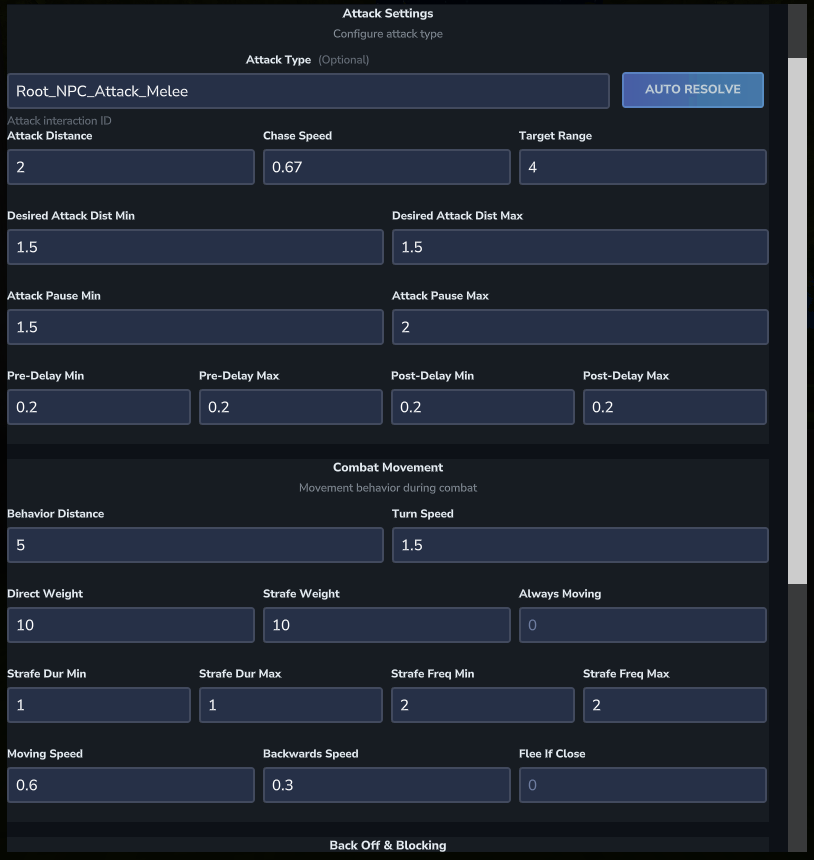
Hytale Value Limits
Hytale enforces minimum and maximum values for all combat parameters. If you change a value and the citizen disappears or behaves unexpectedly, check the server console — it will print the valid min/max range for the field that was out of bounds.
Attack Settings
| Field | Description | Default |
|---|---|---|
attackType |
The attack ability name to use | Root_NPC_Attack_Melee |
attackDistance |
Distance at which the citizen can land an attack (blocks) | 2.0 |
desiredAttackDistanceMin / Max |
The preferred distance range the citizen tries to maintain while attacking | varies |
attackPauseMin / Max |
Time range (seconds) between attacks | varies |
combatAttackPreDelayMin / Max |
Wind-up time before the attack animation fires | varies |
combatAttackPostDelayMin / Max |
Recovery time after the attack fires | varies |
Blocking
| Field | Description | Default |
|---|---|---|
blockAbility |
The block/shield ability to use | Shield_Block |
blockProbability |
Chance (0–100) the citizen attempts to block incoming attacks | 50 |
Movement in Combat
| Field | Description | Default |
|---|---|---|
chaseSpeed |
Speed multiplier when chasing a target (0–1) | 0.67 |
combatBehaviorDistance |
Distance at which the citizen switches into active combat mode (blocks) | 5.0 |
combatStrafeWeight |
Weight for strafing (side-stepping) movement during combat | 10 |
combatDirectWeight |
Weight for moving directly toward the target during combat | 10 |
combatMovingRelativeSpeed |
Speed while moving toward target in combat (0–1) | 0.6 |
combatBackwardsRelativeSpeed |
Speed while moving backwards in combat (0–1) | 0.3 |
combatFleeIfTooCloseDistance |
If a target gets closer than this distance, the citizen will flee. Set to 0 to disable. |
0 (disabled) |
backOffAfterAttack |
Whether the citizen steps back after attacking | true |
backOffDistance |
How far to step back after attacking (blocks) | 4.0 |
backOffDurationMin / Max |
Time range (seconds) spent backing off | varies |
Targeting
| Field | Description | Default |
|---|---|---|
targetRange |
Range within which the citizen acquires a new target (blocks) | 4.0 |
targetSwitchTimerMin / Max |
How long before the citizen can switch to a different target | varies |
Detection Configuration
Access via Behaviors → Advanced Configuration → Detection Config. Detection controls how and when a citizen notices players.
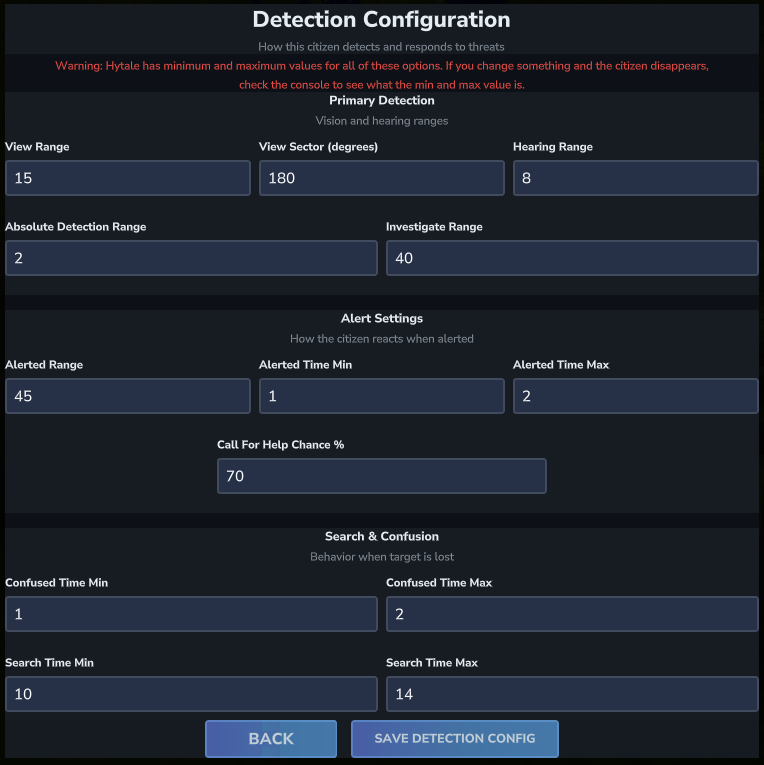
Detection Ranges
| Field | Description | Default |
|---|---|---|
viewRange |
How far the citizen can see (blocks) | 15 |
viewSector |
Field of view in degrees | 180 |
hearingRange |
How far the citizen can detect player movement (blocks) | 8 |
absoluteDetectionRange |
Always detects players within this range, ignoring line of sight (blocks) | 2 |
alertedRange |
Radius in which nearby citizens are also alerted (blocks) | 45 |
investigateRange |
How far the citizen will travel to investigate a sound or last-known position (blocks) | 40 |
chanceToBeAlertedWhenReceivingCallForHelp |
Probability (0–100) of responding when a nearby citizen calls for help | 70 |
Alert & Search Timers
| Field | Description | Default |
|---|---|---|
alertedTimeMin / Max |
Time (seconds) the citizen stays in the alerted state | 1.0 – 2.0 |
confusedTimeMin / Max |
Time (seconds) the citizen appears confused after losing a target | 1.0 – 2.0 |
searchTimeMin / Max |
Time (seconds) the citizen actively searches for a lost target | 10.0 – 14.0 |
attackDistance and set combatFleeIfTooCloseDistance to a positive value so the citizen tries to maintain range instead of closing in.
blockProbability to 0 to completely disable blocking, or 100 to make the citizen block every incoming attack.